











Cage locked digits
A digit required by a cage is confined to one row, column or box. Remove it from that house outside the cage.
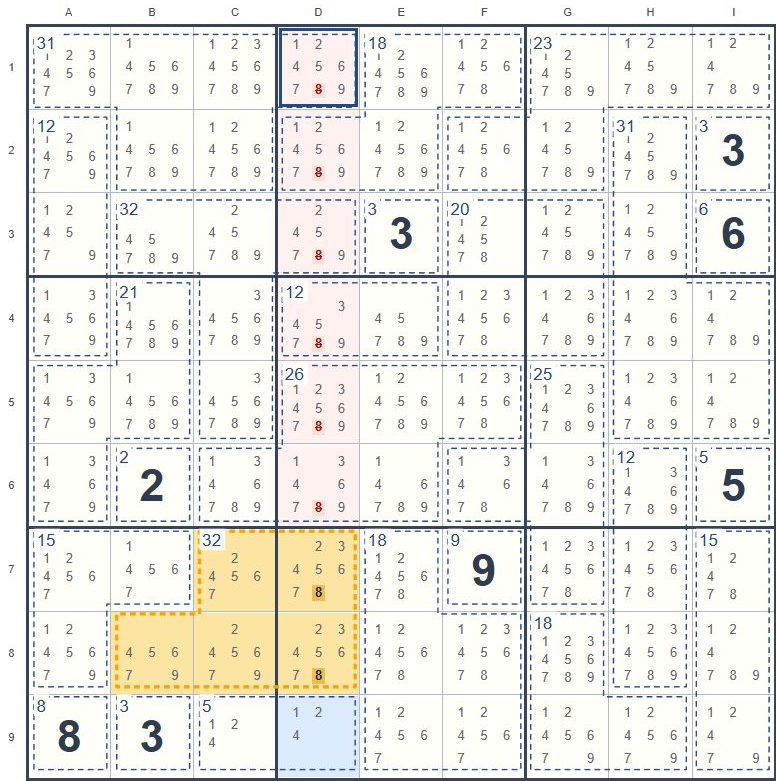
The cage at C7, D7, B8, C8 and D8 needs 8, and all its possible positions lie in column D. Remove the marked candidates from column D outside that cage.
What to look for
Find a digit present in every possible combination for a cage. Check whether all its remaining positions in that cage share a row, column or box.
Why it works
The cage must contain the digit, and it must go somewhere among those positions. The shared house will therefore get its copy of the digit inside the cage. No cell in that house outside the cage can contain it.
Try it step by step
- Confirm that the digit is required in every valid cage combination.
- Find every cell in the cage where that digit can still go and identify a house shared by all those cells.
- Remove the digit from the other cells of that house outside the cage.
Required means present in every combination
A digit merely appearing in the cage's candidate notes does not make it required. For example, a two-cell total of 9 can use {1, 8} or {4, 5}, so the total alone does not guarantee a 1. Establish that the digit must occur before using its restricted positions.
Try it on a real puzzle
Start with the highlighted step, then keep solving. Use "Apply hint" to make the suggested change, or enter your own digits and candidate notes. Use "Undo" to reverse your last change.
| A | B | C | D | E | F | G | H | I | |
|---|---|---|---|---|---|---|---|---|---|
| 1 | |||||||||
| 2 | |||||||||
| 3 | |||||||||
| 4 | |||||||||
| 5 | |||||||||
| 6 | |||||||||
| 7 | |||||||||
| 8 | |||||||||
| 9 |
Use the arrow keys to move, 1-9 to enter a digit and Backspace or Delete to clear a cell. To add or remove a candidate, press C and then 1-9.
Source puzzle number: 13229K · Play this puzzle from the start
A simple example
A two-cell cage totaling 17 must contain 8 and 9. If both cells are in row 2, that row's 8 and 9 must be inside the cage. Remove both candidates from the rest of row 2.
A house is a row, column or 3 × 3 box. Digits cannot repeat in a house or a cage. A cage total applies only to the cells inside its outline. Columns are labeled A-I from left to right and rows 1-9 from top to bottom. C1 means column C, row 1. Boxes are numbered 1-9 from left to right and top to bottom. Braces such as {1, 2} show a cell's candidates, not confirmed digits.